As an Amazon Associate this site earns from qualifying purchases.
Comparison table
| Product | Price | Ring size | Mount / height | Color options | Brightness | Remote |
|---|---|---|---|---|---|---|
| Weilisi 10.2" Desk Ring Light with Stand | Check price on Amazon | 10.2" | C-clamp (to 2.34"), 11.42" telescoping pole | Not stated | Not stated | Not stated |
| UBeesize 12" LED Ring Light with 62" Tripod Stand | Check price on Amazon | 12" (240 LEDs, 10W) | Tripod to 62", converts to selfie stick | 5 modes, 3000K–6000K | 10 levels (10–100%) | Bluetooth shutter |
| NEEWER Basic 5" Ring Light BR60 | Check price on Amazon | 5" (60 LEDs, 10W) | Clip (to 1" thick) + mini desk tripod, ~9cm rise | 5 modes, 3000K–6000K, CRI >97 | 10 levels (10–100%) | Not stated |
| LitONES Desk Ring Light, CRI 97.8 | Check price on Amazon | 7" | Metal base, 22"–32.5" adjustable | 3 temps, 3000K–6500K, 30 light modes, CRI 97.8 | 10 levels | Not stated |
| Weilisi 10" Ring Light with Stand 72'' Tall | Check price on Amazon | 10" | Tripod to 62", 72" overall; 1/4" thread | 3 whites + RGB dynamic modes | Stepless 1–100% | Not stated |
| Sensyne Ring Light with Stand, 50" Phone Tripod | Check price on Amazon | Not stated | Tripod 15.7"–50" | 3 modes (warm/natural/cool) | 10 levels | Wireless, 30ft |
Quick answer: If you stream from a desk and want the light out of your keyboard's way, the clamp-mounted Weilisi 10.2" Desk Ring Light with Stand is the most sensible default at $39.99. If you stream standing up or shoot full-body content on a phone, the UBeesize 12" LED Ring Light with 62" Tripod Stand, Phone Holder & Remote gives you far more reach for less money. And if you just need your face to stop looking like a webcam ghost on Zoom, the $16.99 NEEWER Basic 5" Ring Light BR60 clips onto your monitor and calls it a day.
Ring lights get sold as one undifferentiated blob of "creator gear," but the six below split cleanly into three jobs: desk-mounted key lights that sit next to a monitor, tall tripod kits built around a phone, and tiny clip-ons for laptops. Buying the wrong category is the mistake, not buying the wrong brand.
Weilisi 10.2" Desk Ring Light with Stand — Best Overall
The reason this one leads is mounting. Instead of a tripod base eating desk space, the Weilisi 10.2" Desk Ring Light with Stand uses a large metal C-clamp that grips a desk edge up to 2.34 inches thick, with a non-slip silicone pad so it doesn't chew up the finish. For a streaming setup where the desk is already crowded with a mic arm, keyboard and monitor stand, that difference matters more than any spec sheet line.
Finding the right best ring lights for streaming comes down to matching the features to how you will actually use it.
The telescoping pole extends 11.42 inches, the head rotates a full 360° on the arm, and the light head itself tilts through 180° — so you can point it at your face for a stream, then flip it down for top-down shots of a controller, product or craft. Weilisi describes it as a full-screen diffused panel that spreads light evenly rather than throwing a hard edge, which is the behaviour you want for a face on camera.
What the listing doesn't state is a color-temperature range or a brightness-level count, so if you specifically need to dial in 5600K to match a window, check the product page details before you commit. At $39.99 it's the priciest here, and the clamp is what you're paying for.
UBeesize 12" LED Ring Light with 62" Tripod Stand — Best for Standing and Full-Body Streams
The UBeesize 12" LED Ring Light with 62" Tripod Stand, Phone Holder & Remote is the most complete kit on this list for $30.93: a 12-inch, 240-LED, 10W ring, a tripod that extends to 62 inches and converts into a handheld selfie stick, a phone holder, a Bluetooth remote shutter and the USB cable.
Controls are on a touch panel — 5 color modes spanning 3000K warm to 6000K cool, and 10 brightness levels from 10% to 100%. That's genuinely useful when you stream at different times of day and your room's ambient color shifts. The head and phone holder rotate 360°, so portrait, landscape, low-angle and overhead are all one adjustment away.
The 12-inch diameter is the largest here, and bigger rings produce softer wrap on a face at the same distance. The trade-off is footprint: a 62-inch tripod with a foot-wide ring on top is not a small object in a bedroom, and it's a floor stand, not a desk mount.
NEEWER Basic 5" Ring Light BR60 — Best Budget Clip-On for Laptops
At $16.99, the NEEWER Basic 5" Ring Light BR60 is the cheapest fix here and, for a lot of people, the correct one. It's a 5-inch, 60-LED unit rated at 450Lx at half a meter, 3000K–6000K, with CRI above 97 — a high color-rendering figure that matters because low-CRI lights make skin tones go strange on camera.
It ships two ways to mount: a clip that grabs a laptop lid, monitor or webcam up to 1 inch thick with 170° of tilt, and a mini desk tripod giving 360° pan, 135° tilt and about 9cm of height. NEEWER notes the clip isn't recommended for smartphones, and that you should mount the clip with its hole on the camera side so it doesn't block the lens. Five lighting modes cycle warm through cool, with 10-step dimming from 10% to 100%. It's 10W over USB 5V/2A with a 6ft cable built in.
NEEWER is explicit that the BASICS line strips out premium materials to hit the price. Read that as: this is a functional fill light, not a hero key light.
LitONES Desk Ring Light with Stand, CRI 97.8 — Best for Color Accuracy on Camera
The LitONES Zoom Lighting for Computer Desk Ring Light with Stand leads with the number that most cheap lights avoid printing: CRI 97.8. It uses edge-lit / side-illuminated LEDs across a 7-inch full-screen face, which is the design meant to kill glare hotspots rather than just throw more lumens at you.
Practically, you get 3 color temperatures across 3000K–6500K, 10 brightness levels, and the listing's headline 30 light modes. Height adjusts from 22 inches up to 32.5 inches on a metal base with a non-slip pad — tall enough to sit above a monitor bezel rather than shining up your nose from desk level, which is the single most common lighting mistake in home streams. The head rotates 360°, there's a 360° phone holder included, and it runs on 10W USB (5V/2A). LitONES lists a 3-year after-sales service.
At $36.99 it's the alternative to the Weilisi clamp if you'd rather have a weighted base and a stated CRI figure than a desk-edge mount.
Weilisi 10" Ring Light with Stand 72'' Tall & Phone Holder — Best for RGB and Color Effects
If your stream leans toward TikTok, dance, makeup or anything where colored light is part of the look, the Weilisi 10" Ring Light with Stand 72'' Tall & Phone Holder is the one to look at, at $25.49. Alongside warm, white and daylight, it does red, yellow, green, sky blue, blue, purple and RGB dynamic, breathing and "illusory" modes.
The control scheme is the actual selling point: stepless dimming from 1% to 100% in both normal and color modes, plus stepless speed regulation for the dynamic effects. Stepless means you're not stuck between "too dim" and "too hot" on a 10-notch ladder.
The tripod is aluminum alloy and metal, reaching 62 inches, with an overall height up to 72 inches, and the phone holder stretches to 3.3 inches. There's a 1/4" screw thread, so it doubles as a camera tripod. Power is USB, and Weilisi recommends a 5V/3A adapter to hit full output — worth noting, because feeding it from a laptop port will leave brightness on the table.
Sensyne Ring Light with Stand, 50" Phone Tripod — Best Simple Phone Kit
The Sensyne Ring Light with Stand, 50" Phone Tripod is the no-frills version of the tripod kit idea at $25.64: ring light, tripod, phone holder and wireless remote in the box, working with iPhone and Android.
Three color modes — warm, natural, cool — and 10 brightness levels cover the basics without a menu to learn. The tripod's range is the interesting part: it collapses to 15.7 inches for desk use and extends to 50 inches for standing shots, so one purchase covers both a seated Zoom setup and a standing filming setup. The head and phone holder rotate 360° for portrait, landscape, overhead and low-angle work, and the wireless remote triggers from up to 30 feet away.
Sensyne doesn't state the ring diameter or a color temperature range in Kelvin, so if you're matching this to existing lights, that's a gap to close on the product page before ordering.
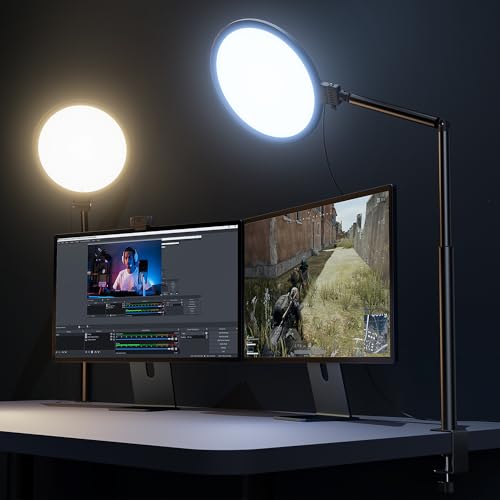
- Soft & Uniform Desk Lamps for Office -Weilisi full-screen desk light provides enough uniform & diffused light, restores natural light, and No Shadow to enhance your subject's
- Upgrade Flexible Height Design -Also as a desk lamps for home office, is designed with telescoping stand, an extendable pole length is 11.42in, this desk lighting makes your
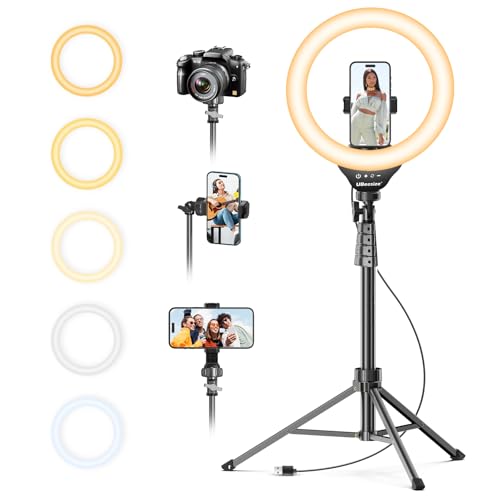
- 【12-INCH RING LIGHT WITH 240 LEDS】Equipped with 240 high-efficiency LEDs, this 10W ring light delivers bright, stable and evenly diffused illumination. The soft light helps reduce
- 【TOUCH CONTROLS, 5 COLOR MODES & 10 BRIGHTNESS LEVELS】Adjust power, color temperature and brightness directly from the responsive touch-control panel. Choose from 5 color modes
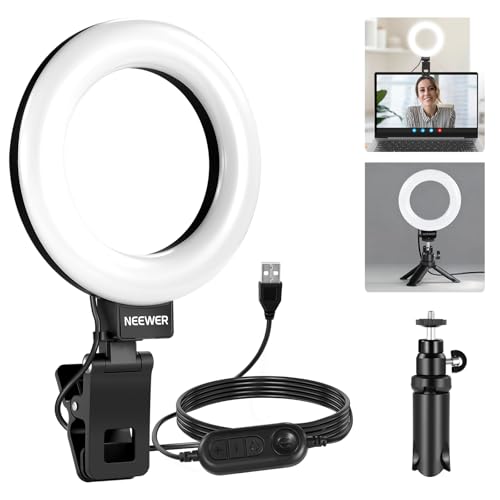
- 【Neewer BASICS Series】These products offer basic functions and designs that meet the essential needs of most customers, while avoiding the high costs associated with over-design
- 【Ring Light For Desk】 NEEWER BR60 clip on ring light with 60 LEDs offers 450Lx illumination at 0.5m, 3000K-6000K color temperature, CRI>97. Clip the ringlight of this photography
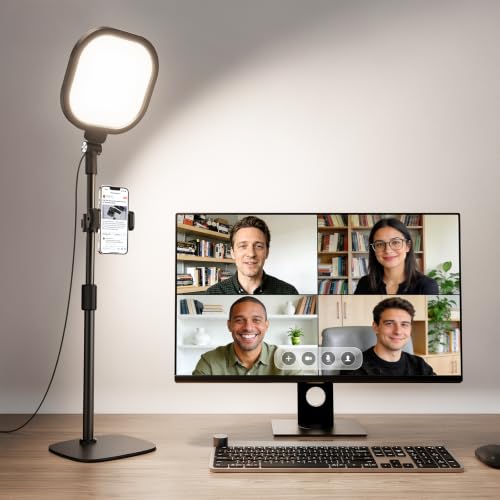
- Uniform and Soft Illumination: LitONES desk video conference light utilizes advanced edge-lit technology, delivering even and gentle lighting perfect for Zoom meetings, video
- Perfect Lighting: The zoom meeting light integrates side-illuminated LED technology and high CRI of 97.8, delivering high-quality, soft illumination that renders vibrant
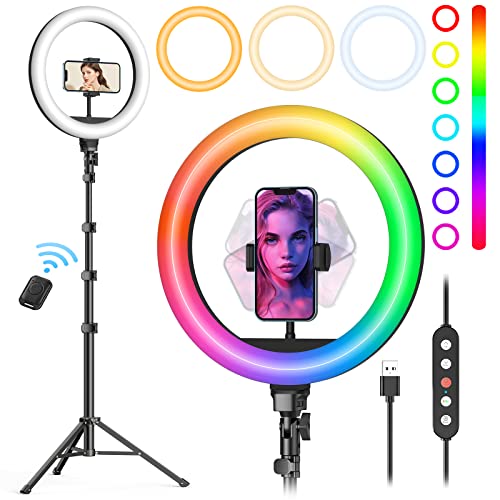
- New RGB Dynamic Modes and 3 Normal Colors: Selfie ring light has warm light,white light,daylight,red,yellow,green,sky blue,blue,purple,RGB light provide 39 dynamic, breathing and
- Precise Control: Our light ring features exclusive stepless speed regulation and dimming. Whether you're in color dynamic mode or adjusting the warmth of the light in conventional
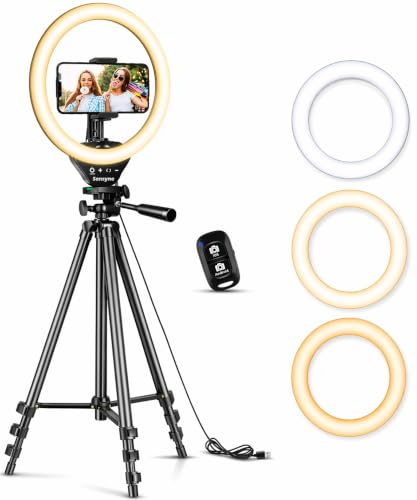
- 【Perfect Lighting for Video, Makeup & Streaming】3 color modes (warm, natural, cool) with 10 brightness levels let you easily create soft, even lighting for TikTok, Zoom calls
- 【50" Adjustable Tripod – Desk to Full Height】Extendable from 15.7" to 50", perfect for desk use, standing filming, or full-body shots. One setup for video calls, live streaming
How to choose
Decide the mount before the light. This is the real fork in the road. A desk streamer sitting at a monitor wants a clamp or a weighted base that puts the light at eye level or slightly above — the Weilisi 10.2" clamp, the LitONES base, or the NEEWER clip. Someone filming standing up, dancing, or doing full-body content needs a floor tripod in the 50–72 inch range. A 12-inch ring on a 62-inch stand is useless three inches from your desk edge, and a 5-inch clip-on can't light a full body.
Check whether color temperature is actually stated. UBeesize (3000K–6000K), NEEWER (3000K–6000K) and LitONES (3000K–6500K) publish ranges. The Weilisi 10.2" desk model does not. If you're matching a light to a window or to a second lamp, an unstated range is a real risk.
CRI is the spec that separates flattering from cheap. Only two here publish it: NEEWER at above 97 and LitONES at 97.8. High CRI means the light renders colors closer to true, which shows up on camera as skin that looks like skin rather than something faintly orange or grey.
Stepless vs. stepped dimming. Most of these give you 10 fixed brightness levels. The Weilisi 10" tripod model gives stepless adjustment from 1% to 100%, plus stepless speed control on its dynamic color modes. If you've ever been stuck between two brightness notches, you know why that's worth something.
Power delivery is a quiet gotcha. These are USB-powered at 10W. NEEWER and LitONES specify 5V/2A; Weilisi recommends 5V/3A on the 10" tripod model to reach maximum power. Plug into a proper wall adapter, not a spare laptop port, or you'll wonder why the light seems dimmer than advertised.
A word on reviews: owner reviews on these listings will tell you a lot about long-term build quality — clamp tension, tripod wobble, whether a touch panel stays responsive. Go read them yourself before you buy; that's information no spec sheet carries.
FAQ
What size ring light do I actually need for streaming? For a seated shot where you're roughly two feet from the light, the 10-inch class (both Weilisi models) or the 12-inch UBeesize gives soft, wrapping light. The 5-inch NEEWER BR60 and 7-inch LitONES are physically smaller sources, which is fine when they sit close to your face on a desk — proximity does a lot of the softening work.
Should the ring light go behind my monitor or beside it? LitONES specifically positions its light as a fill placed behind or next to a laptop or monitor, and its 22–32.5 inch height range exists so it can clear a monitor bezel. The general principle: get the light above eye level and pointing slightly down. A light below your face is the fastest way to look unsettling on camera.
Can I mount one of these on a crowded desk without losing space? That's the case for the Weilisi 10.2" model — its C-clamp grips a desk edge up to 2.34 inches instead of occupying surface area, and the silicone pad protects the finish. The NEEWER BR60's clip is the other space-free option, since it attaches directly to a monitor or laptop lid under 1 inch thick.
Do I need the remote? Only if you're recording solo away from the phone. The UBeesize kit includes a Bluetooth shutter and the Sensyne includes a wireless remote good to 30 feet — both genuinely useful for filming yourself standing across the room, and irrelevant if you're streaming live from a desk with a keyboard in front of you.
Related guides
- Expert Advice on Best drones, gimbals and content creator gear - camera drones, smartphone gimbals, action cameras, ring lights and stream decks
- Best Foldable Travel Drones Under $500
- Best drones, gimbals and content creator gear - camera drones, smartphone gimbals, action cameras, ring lights and stream decks with Past Challenges
Key Takeaways
- Choosing the right best ring lights for streaming means matching the key features to your specific needs and budget
- Read real customer reviews and check the return policy before you commit
- Compare value across models — the priciest option is not always the best fit